Network Security Scan
Discovers devices visible on your LAN and highlights risk signals with clear visibility notes and basic identifiers where available.
See what’s really on your network — detect Wi-Fi risks, unknown devices, and security issues before they become a problem.
No signup • Takes 5 seconds • Free to try
CyberShield AI VPN is an iOS VPN and network security scanner that helps detect Wi-Fi vulnerabilities, unknown devices, and privacy risks. Unlike traditional VPN apps, CyberShield combines encryption with AI-powered security insights.
Most home networks have unknown devices or weak settings — scan yours in seconds.
CyberShield VPN Guard protects you automatically:
Free locations included • Upgrade for premium servers and streaming
UK-based infrastructure • Global secure network
No tracking. No ads. No account required for basic features.
OneScan Security Center
AI-powered OneScan shows real exposure across your network in seconds.
OneScan brings network-level signals and device posture checks into a single, calm dashboard for iOS. Learn more about iOS security features
Powered by CyberShield VPN Guard™. Real-time protection and risk analysis — without content inspection.
Problem
Most tools either scan too shallow or demand invasive access. That leaves teams guessing what is actually exposed.
Solution
OneScan highlights real exposure from network-level signals and on-device posture checks — never traffic inspection.
Powered by CyberShield VPN Guard™ — real-time protection, enabled by default for all users.
Built for privacy-first security teams.
No packets decrypted. No personal content accessed.
Discovers devices visible on your LAN and highlights risk signals with clear visibility notes and basic identifiers where available.
Surfaces gateway details and basic router indicators, including UPnP status when visible, and labels limits clearly.
Reviews visible wireless security details and flags weak configurations; encryption details may be limited on iOS.
Prioritises risk signals and highlights unknowns with clear confidence notes, based on network and device posture signals.
Detects exposure patterns linked to AI-powered scams and impersonation attempts, with unknowns highlighted when iOS limits visibility.
Flags suspicious patterns using curated intelligence and privacy-preserving signals, without traffic decryption or content inspection.
See devices detected on your network and review unknown devices.
Summarizes iOS posture signals like OS version and protection settings, including passcode and biometrics status.
Run a quick speed and latency check to validate real-world performance.
Discovers devices visible on your LAN and highlights risk signals with clear visibility notes and basic identifiers where available.
Surfaces gateway details and basic router indicators, including UPnP status when visible, and labels limits clearly.
Reviews visible wireless security details and flags weak configurations; encryption details may be limited on iOS.
Prioritises risk signals and highlights unknowns with clear confidence notes, based on network and device posture signals.
Detects exposure patterns linked to AI-powered scams and impersonation attempts, with unknowns highlighted when iOS limits visibility.
Flags suspicious patterns using curated intelligence and privacy-preserving signals, without traffic decryption or content inspection.
See devices detected on your network and review unknown devices.
Summarizes iOS posture signals like OS version and protection settings, including passcode and biometrics status.
Run a quick speed and latency check to validate real-world performance.
Security Center Preview
Each screen surfaces only what iOS allows — clearly labeled, never inferred.

VPN Traffic Protection
CyberShield VPN encrypts traffic in transit and helps reduce IP exposure to many websites. Works best when traffic protection is enabled.
VPN protection features
Encrypts traffic between your device and the VPN exit node, adding privacy for everyday browsing.
Designed to reduce exposure on shared networks with consistent, secure routing.
A real-time safety score based on your connection and protection status. Higher scores indicate stronger protection when VPN traffic protection is active.
Included for all users
Real-time protection that helps block known ads, trackers, and malicious redirects. Active by default, even on the Free plan.
Runs locally. No content inspection.
Learn how Guard works →A transparent score based on encryption status, network type, and tracking exposure — designed to reflect real-world protection.
Learn how it’s calculated →How It Works
Use CyberShield VPN as a VPN, a security insight tool — or both.
VPN Protection Flow
Start a secure session with a single tap.
Your traffic is encrypted in transit and securely tunneled through CyberShield VPN.
Maintain privacy while browsing or working on the go.
OneScan Insight Flow
Discover devices and visible network signals.
AI prioritises what needs attention.
Follow guided actions to improve posture.
App Preview
Real screenshots from the iOS app. No mockups.
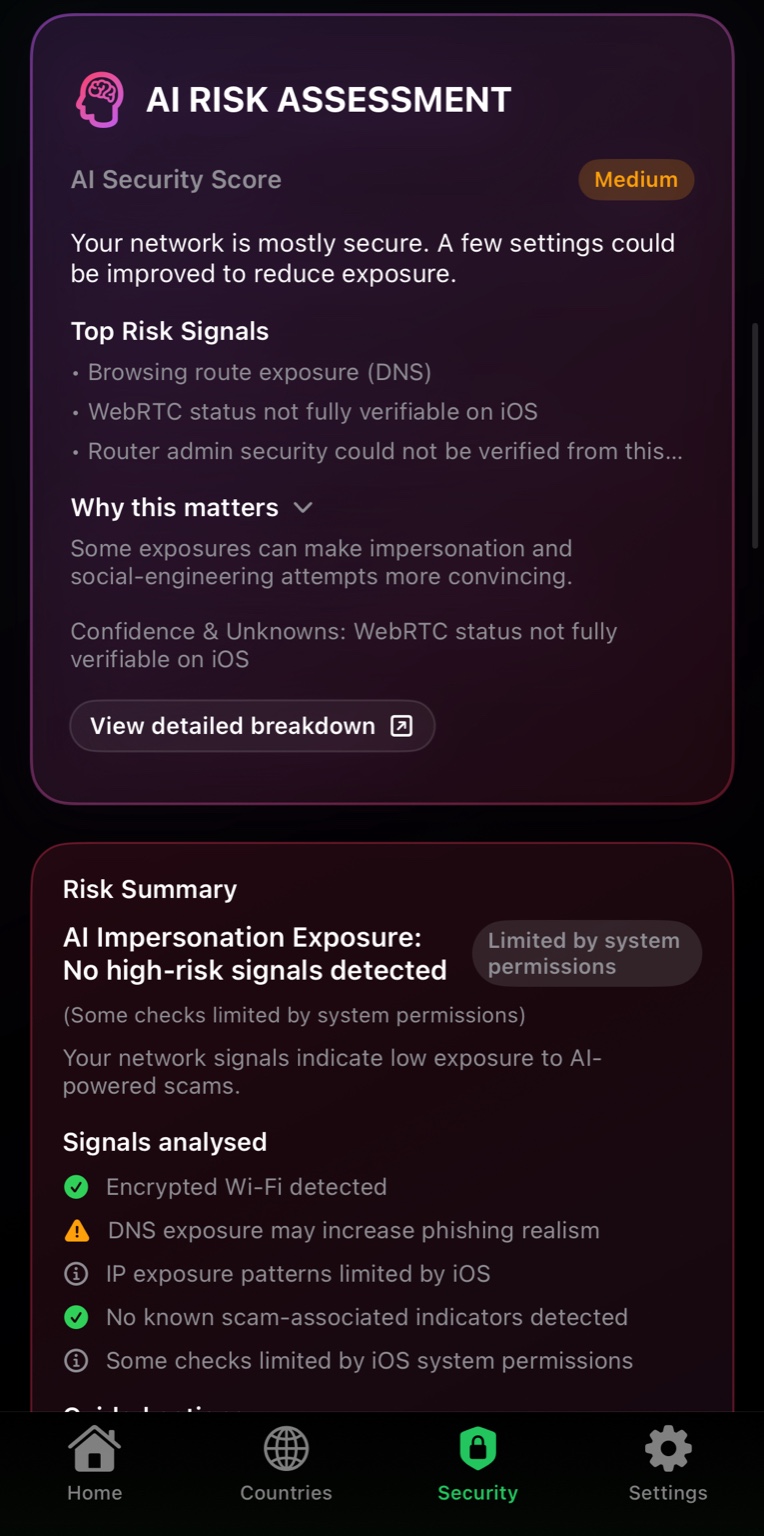
AI-prioritised security risks
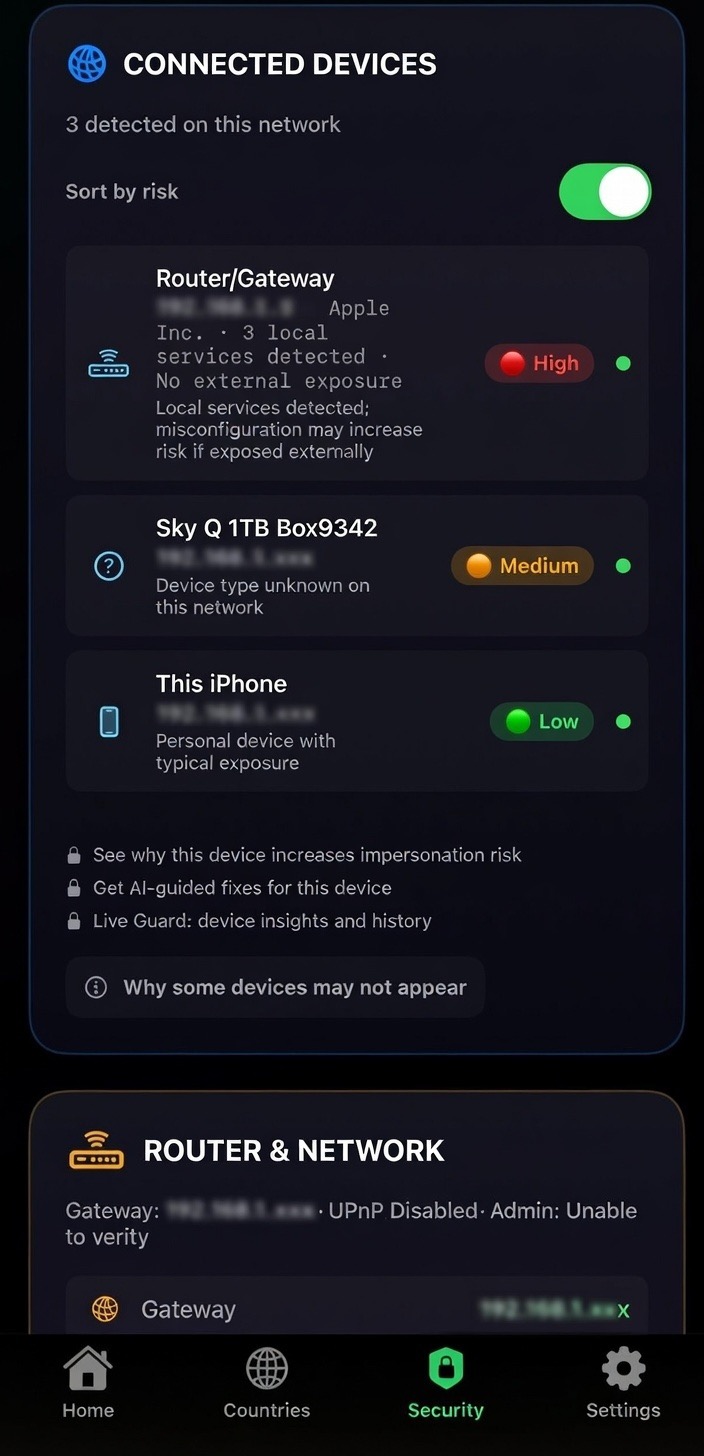
See what's on your network
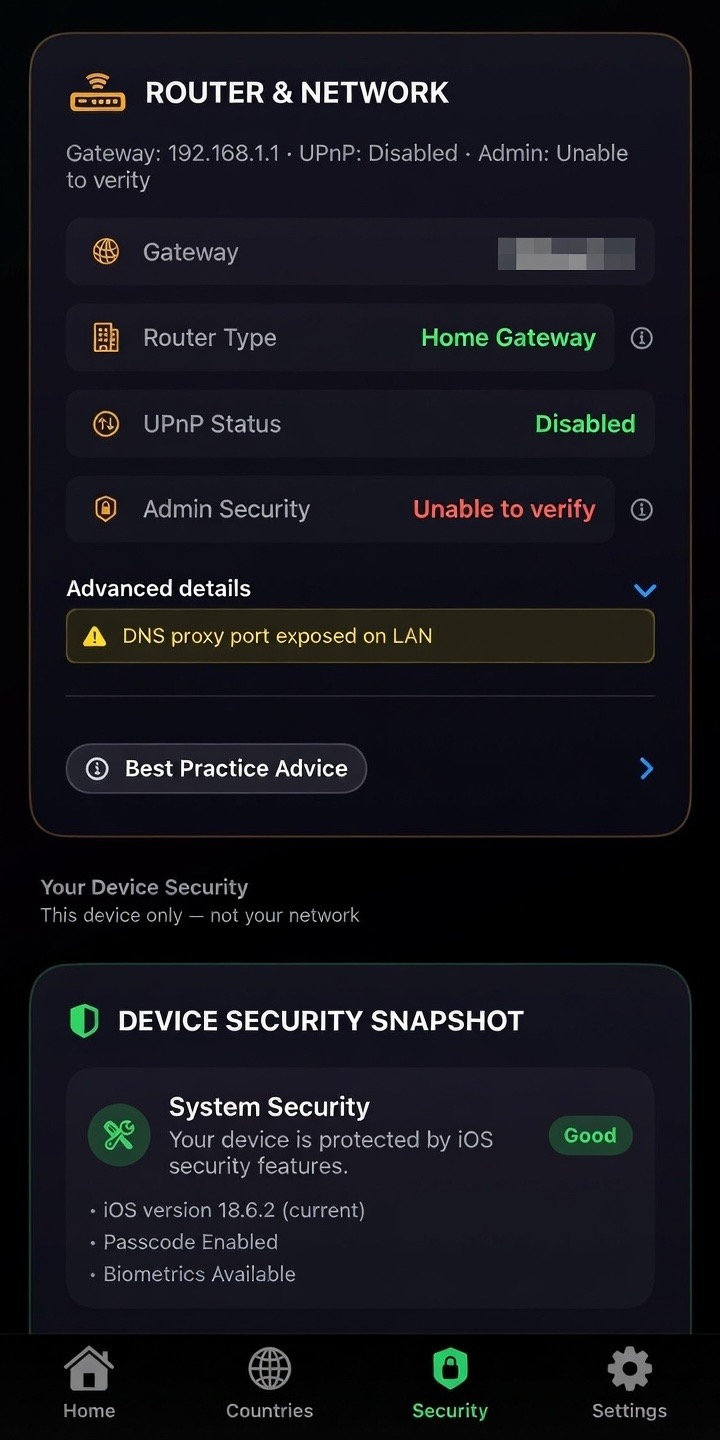
Live router & network security signals
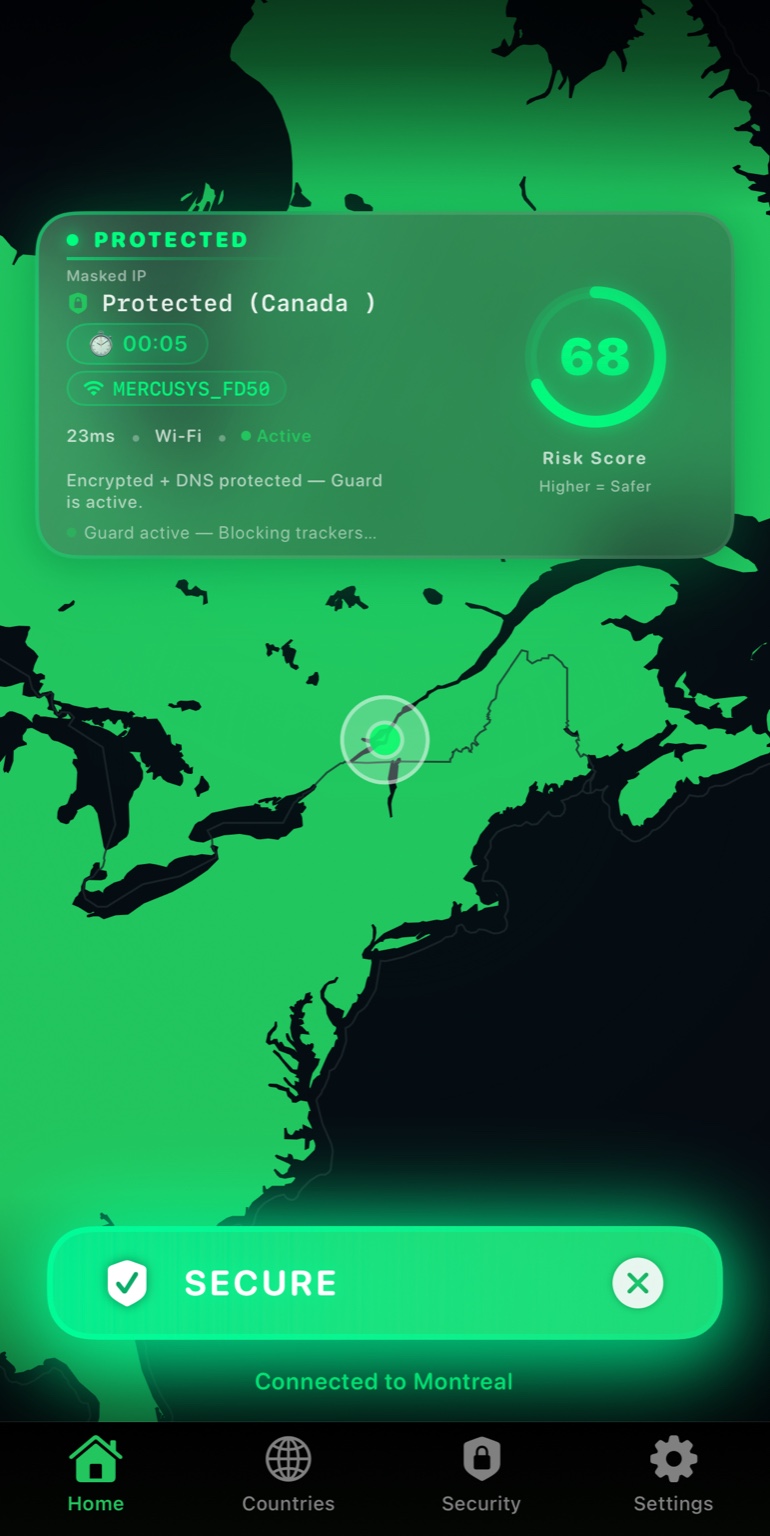
Protection status - at a glance
Pricing
Includes free shared locations. Premium unlocks advanced routing and performance features.
Plans & pricing
£0
Available on the App Store
£29.99
≈ £2.49 / month
Most popular plan for full protection
Save ~50% vs monthly
Full coverage, billed annually
£4.99
✓ Cancel anytime
Billed monthly via the App Store
Flexible monthly access
No accounts. No activity logs. On-device analysis where possible.
Quick comparison — full details below
| Feature | Free | Premium |
|---|---|---|
| Traffic protection (VPN) | Included | Included |
| Free shared locations | Included | Included |
| Premium servers (more locations) | Upgrade | Included |
| Streaming & Smart Routing | Upgrade | Included |
| P2P servers | Upgrade | Included |
| Core ad & tracker blocking (DNS-based) | Included | Included |
| Advanced protection & guided fixes (CyberShield VPN Guard) | Upgrade | Included |
| Advanced OneScan insights | Basic | Included |
| Priority performance | Upgrade | Included |
Trust & Privacy
No traffic inspection, no browsing logs, and no user accounts. On-device analysis where possible, with iOS limitations explained clearly. UK-based service.
Real screenshots. Real signals. No mockups.
Designed to meet Apple App Store privacy requirements.
FAQ
OneScan is a security center that combines network discovery, router indicators, device posture signals, and AI risk scoring in one place.
No. CyberShield VPN does not access calls, messages, emails, photos, or personal content.
Some network and device signals are limited by iOS permissions or router visibility, so we flag when a check cannot be fully verified.
Devices can be hidden by router settings, segmented networks, or limited visibility on iOS. OneScan will note unknowns when needed.
Both. CyberShield VPN provides VPN traffic protection and OneScan security checks that work together to improve privacy and awareness.
We operate a no-logs policy for VPN traffic. We do not log browsing activity, DNS queries, or connection history. See the Trust section for scope and platform limitations.
No. CyberShield VPN does not sell, rent, or share user data with third parties. We do not use advertising trackers or analytics SDKs.
CyberShield VPN Guard is our protection layer that combines DNS-based blocking, traffic protection, and risk-aware safeguards to reduce tracking, phishing, and exposure while connected.
Yes. When enabled, VPN protection and selected safeguards remain active in the background, subject to iOS system limits.
Most VPNs only change your IP. CyberShield VPN focuses on visibility, clarity, and understanding risk - not just hiding it.
It prioritises risk signals from network and device posture checks, highlights unknowns, and suggests guided actions without inspecting content.
Your CyberShield VPN subscription is tied to your Apple ID and can be used on multiple iOS devices that you personally own and sign into with the same Apple ID.
CyberShield VPN does not currently support Apple Family Sharing. Each Apple ID manages its own subscription through the App Store.
Family sharing support may be added in a future update, but is not available at launch.
You can cancel anytime through your Apple ID subscription settings in the App Store.
Support
No signup. No tracking. Works instantly.
Accessibility first: Cybershield VPN supports VoiceOver, Dynamic Text, Reduced Motion, and enhanced contrast to ensure the app is usable for a wide range of users.
Cybershield automatically adapts to iOS accessibility settings for text size, motion, and contrast.